This is just ads with extra steps
Split Keyboards Are Superior And The Reason I’m The Writer I Am Today.
Submitted 1 year ago by Tea@programming.dev to technology@lemmy.world
https://aftermath.site/best-split-keyboards-diy-qmk-zmk-corne
Comments
tacobellhop@midwest.social 1 year ago
GoumLeChat@jlai.lu 1 year ago
So is this the new trend after 60% mechanical keyboards, ultrawide monitors or immutable distros ?
Maybe it would improve my typing speed, but I’ve been using a conventional keyboard layout for so long now, I’m fine with where I’m at. Almost thirty years of muscular memory made it “hard coded” in my hands.
merde@sh.itjust.works 1 year ago
it seems to be perfect for people who are not working on a desk
sirico@feddit.uk 1 year ago
You don’t use a spilt keyboard set to colemak exclusively running Emacs weird
rmuk@feddit.uk 1 year ago
Sawme here! Honmestly I dom"t thinkl I coukd ever go vack tp a mormal keyboard ¶¶¶¶
BlueMagma@sh.itjust.works 1 year ago
Recently bought a CharaChorder, haven’t mastered it yet but it is promising.
RememberTheApollo_@lemmy.world 1 year ago
I think one of my favorite keyboards ever was a Microsoft “Natural” keyboard. I think they were available in the mid ’90s or so. Not quite a real split keyboard, but the ergonomics were great. I think I gave it away…it was great for typing, but I wanted a simpler keyboard for gaming.
kieron115@startrek.website 1 year ago
the one with the biiig built in “leather” wrist rest? loved that thing!
oppy1984@lemm.ee 1 year ago
I use a knock off ergonomic keyboard from adesso. 60% of the time, it works every time.
You can still get them on Amazon for like $40 if you ever decide you want to relive the split key glory days.
Tronn4@lemmy.world 1 year ago
SkaveRat@discuss.tchncs.de 1 year ago
Fun fact: that’s Elijah Wood and it’s his first film role
whotookkarl@lemmy.world 1 year ago
As long as it’s got mech switches and can run a qwerty layout I’m happy
I_Has_A_Hat@lemmy.world 1 year ago
That’s ok, insanity comes in many forms.
toynbee@lemmy.world 1 year ago
When I was a kid, I got my hands on a PS/2 Y-adapter and so typed on two keyboards - left hand on one in my desk, left hand on one on a keyboard tray. I don’t know what my typing speed and accuracy were then, but a few years back an entire office of people tried to beat me in a typing test and couldn’t. Since then I’ve taken a typing test on a laptop while sitting in a hotel bed and gotten a score of 158 with, IIRC, 98.2% accuracy. (This was my best score but even since then all of my typing evaluations have gone well.)
I also use a trackball as exclusively as my environment allows, including while gaming (other than Minecraft). I’m not remotely a pro, but among my peers I tend to score highly in, for example, FPS’.
I’m not trying to brag; there are many better than I in both categories. The reason I bring these up is to demonstrate that something being the convention doesn’t automatically make it better and something being unfit for your preferences doesn’t make it inferior.
CoffeeBreakfast@sh.itjust.works 1 year ago
Which trackball? I was looking at them the other day but couldn’t decide
ryan213@lemmy.ca 1 year ago
I just want The Wheel.
Bamboodpanda@lemmy.world 1 year ago
ryan213@lemmy.ca 1 year ago
One of Jobs’ many failures was not getting this into market.
ExLisper@lemmy.curiana.net 1 year ago
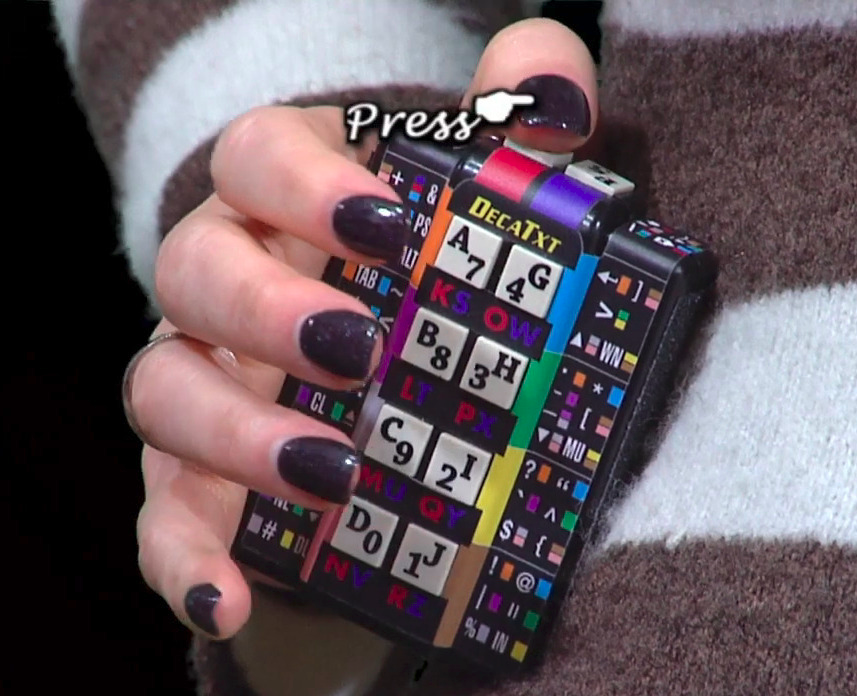
Here’s what I want: tiny, one handed bluetooth chord keyboard.
For typing on my phone. Can someone make one?
pirat@lemmy.studio 1 year ago
I think someone was making something similar but was a two handed thing that attarched to magnetic hip clips.
ripcord@lemmy.world 1 year ago
Aren’t there hundreds? Like this one? Or maybe I don’t know what you mean by “chord” keyboard, or you want more tiny?
AnarchistArtificer@slrpnk.net 1 year ago
(tangent to your question because someone already answered) I think that courtroom stenographers (people who type up what’s said) use special chording keyboards. I’ve also been to a few events where there has been someone transcribing things in real time for accessibility purposes, and they also use a cool looking chording keyboard. It takes some learning, but the max typing speed is way faster than any conventional keyboard could manage — which is why skilled people use them for transcribing stuff
A brand that I’m aware of that does them is Charachorder.
ExLisper@lemmy.curiana.net 1 year ago
baldingpudenda@lemmy.world 1 year ago
you can make a ferris sweep. you would just choose which side you’d want and setup your layout with QMK. If you want Bluetooth, just use the nice! Nano controller. A coworker built one. It’s tiny, about the size of your hand. He would also carry it around in his pockets and connect through USB to his phone for emails.
The only problem is he customized the hell out of the layout. I think he used Colemak. His layers kinda looked like this:
He said he had trouble using regular keyboards after getting used to it. He always had to carry it around with him.
ExLisper@lemmy.curiana.net 1 year ago
Yeah, that’s a lot of work with tools I have no idea with. Definitely a fun project but I don’t have the time.
smiletolerantly@awful.systems 1 year ago
I built and configured an Arkenswoop some time in 2023. It’s really nice. However… I have gotten quite fast on a conventional keyboard just by using it over the years, and re-learning that is just so tedious. Every time I try, something with a deadline comes up, and I switch back “temporarily”.
Anyone have experience overcoming this?
toynbee@lemmy.world 1 year ago
I’m going through this currently trying to find a privacy respecting Android keyboard.
Latest effort is Futo, recommended by a coworker. So far, I don’t like it.
smiletolerantly@awful.systems 1 year ago
As a fellow Futo user: it’s not great out of the box. My biggest recommendations are:
- under Languages and models, download all the voice models (if you use those), transformers, and wordlists you can for your languages
- if you use multiple languages, set the check on “multilingual typing” for ALL of those languages
- this is probably the biggest one: in text prediction -> Advanced Parameters, DRASTICALLY change the values. The original ones are 3.4 and 4.0 for LLM strength and autocorrect threshold, mine are currently set at 28.5 and 0.8, respectively. This takes the autocorrect from “occasionally working” to “as good as SwiftKey” for me.
- Keyboard and Typing -> Long Press -> Show hints. Could not find that for ages so thought I’d add it here.
Also, two super useful shortcuts: you can press the space-bar and move your finger around to move the pointer; and the same for backspace to fine-control what to delete.
Hope this helps, but if not… What additional gripes do you habe with it?
gusgalarnyk@lemmy.world 1 year ago
I switched to a new key layout and was slowed down for like a month, and almost every day I could literally feel myself speeding back up. It was such a cool experience, and one that I imagine has beneficial like neural effects, that sometimes I think about switching it up just for fun.
I’d suggest just sticking with it. I now use English, German, and my custom Workman layout at home without any issue switching between them. Practice makes perfect and cause a bunch of work and fun things encourage typing a lot, practice comes easy and getting back to your normal speed happens quickly.
Picking a new layout like Workman or Dvorak where you can feel the benefits, plus a split keyboard’s ergonomic benefits, and I think anyone would struggle to go back (assuming they do it for a month and give it a fair shake).
smiletolerantly@awful.systems 1 year ago
That sounds great. I think I’ve given it more than a month overall, but probably never longer than a week at a time. Guess I’ll have to have my SO hide my normal keyboard lol
Valmond@lemmy.world 1 year ago
I have had to use swedish (various), english, american, french and german keyboards, I have to look at the keyboard when I type :-/
Maybe I should just go DVORAK or something and always carry one with me…
Jestzer@lemmy.world 1 year ago
As somebody who fully switched to Dvorak about 10 years ago, it has its benefits, but man oh man, does it bring out the shitty programmers who don’t realize that anything other than US QWERTY exists.
daggermoon@lemmy.world 1 year ago
Where’s the rest of the keys? Also these things give off Nintendo Power Glove vibes.
markstos@lemmy.world 1 year ago
It uses layers, the same way a phone keyboard has a separate layer for numbers and symbols. Holding down one of the three thumb keys on either side activates a new layer. Since you can use your thumb and fingers at the same time, there’s no lose in typing speed. Indeed, the layout puts numbers and symbols closer to the home row on a layer than using a physical number number.
For all symbols, you would have needed a shift-modifier to access those before. With this design, the symbols are closer but use a layer switch key instead of a shift key to access them.
Everyone who uses a phone keyboard has learned a new compact keyboard layout. It’s not so hard.
prole@lemmy.blahaj.zone 1 year ago
I love the Power Glove… It’s so bad.
Flocklesscrow@lemm.ee 1 year ago
Every Power Glove sold should have come with one complimentary Fred Savage
ArchmageAzor@lemmy.world 1 year ago
Hear me out, take the optic sensor from a mouse and put it on the bottom of one of those boards. Then you wouldn’t have to move your hand to use a mouse.
omega@startrek.website 1 year ago
Or just get one that has a trackball/touchpad/trackpoint, like ultimatehackingkeyboard.com
prole@lemmy.blahaj.zone 1 year ago
Bruh what are you doing posting million dollar idea like this on a public forum?!
Evilschnuff@feddit.org 1 year ago
I find the topic interesting and want to both experiment with the ortholinear and split concepts. But the main thing holding me back is the same reason I am using zsh and not fish: compatibility. I don’t want to confuse myself with two ways of typing when I need to work on another pc and I will not be using a split keyboard on my laptop for example.
gofsckyourself@lemmy.world 1 year ago
I’ve used plenty of ergo keyboards and fancy layouts, but as soon as I try to use a regular keyboard I have to re-learn how to type and it really halts any productivity.
This sort of thing may be nice if you only ever use one computer or you’re willing to pack around your keyboard.
Even still, I never liked ergo boards enough to think it’s worth the effort, especially considering being useless on other keyboards once I’m used to ergo.
Now I just stick to a 75% or TKL. Keeps me versatile.
monarch@lemm.ee 1 year ago
I just got my keyboard in and I explicitly got one that I can easily take places so it won’t be an issue.
communist@lemmy.frozeninferno.xyz 1 year ago
I don’t have this experience, I am briefly confused for a second and then it’s fine, are you sure this lasts more than like 30 seconds?
barsoap@lemm.ee 1 year ago
When I’m forced into a qwerty situation it’s not just 30 seconds, I simply can’t touch-type qwerty and my current qwerty skills are way slower than 25 years ago where I had reached peak seven-and-a-half-fingers hunt-and-peck performance. In principle I should know where all the keys are, still, I can’t find them without looking.
Valmond@lemmy.world 1 year ago
TKL FTW BTW!
dodos@lemmy.world 1 year ago
Both of mine died lately and I want to get them working again, but qmk is a nightmare I don’t want to have to touch again.
TheBat@lemmy.world 1 year ago
queermunist@lemmy.ml 1 year ago
Imagine playing Dwarf Fortress in a recliner with a pair of these.
prole@lemmy.blahaj.zone 1 year ago
As someone who has only played since the Steam version, I don’t know how you people did it with the ASCII graphics and lack of mouse support.
ripcord@lemmy.world 1 year ago
Hmmm… I see a balding fat dude wearing a lot of Cheeto dust on his shirt
PlutoniumAcid@lemmy.world 1 year ago
I was the lucky owner of a rare FingerWorks Touchstream keyboard for many years. If you don’t know it, it’s the precursor to the keyboards used in Star Trek Enterprise.
It’s a keyless keyboard. Two large flat mousepads with a keyboard layout printed on top, and you type by pure touch. There’s no mouse; the surface just cleverly detects when you are doing mouse gestures. Or a lot of other gestures.
Trekkie joke aside, it’s actually the magic tech that made the iPhone possible. Of course Apple didn’t invent anything, they bought existing future tech.
I miss that keyboard. They still sell on ebay, for 1400$!
prole@lemmy.blahaj.zone 1 year ago
You mean I can have all of the worst aspects of modern smart phone keyboards with my desktop? Sign me up!
ArchmageAzor@lemmy.world 1 year ago
That sounds awful though. There’s a reason why touch pads are so unpopular in cars, there’s no tactile feedback to the buttons. Part of learning to type is getting a feel for the keys.
datendefekt@feddit.org 1 year ago
Many, many moons ago (must have been around 2006?) I managed to procure a FingerWorks. It was magic, like holding a piece of computing history!
It allowed a lot of the gestures we take for granted, to switch applications or workspaces, to go back a page, etc. But it also had really cool stuff. You could bind gestures like twisting your fingers clockwise to open a file (just like opening a jar!) or counterclockwise to close it. Pinch and zoom for copy and paste.
I was only able to get a hold on a Dvorak copy. And because the key labels were printed on the board, you couldn’t really change the layout. Getting used to a split layout, no keys and Dvorak at the same time was too much and I had to sell it again. But I’ve been using split keyboards ever since!
prole@lemmy.blahaj.zone 1 year ago
Seems cool but kind of gimmicky (particularly the twist gestures to open files). I’ll take actual tactile feedback over gimmicky features.
grooving@lemmy.studio 1 year ago
There is a guy out there developing a mouse less solution so you never have to take your fingers off the keyboard too called www.mouseless.click I’m just waiting for him to release the Windows version. Only on apple atm
ExcessShiv@lemmy.dbzer0.com 1 year ago
IDK, a mousetrapper effectively does the same but doesn’t require retraining your entire workflow and still allows for precision mouse work.
grooving@lemmy.studio 1 year ago
Ah, doesn’t work with my tented split key setup. But it’s a cool idea.
grooving@lemmy.studio 1 year ago
Oh thanks. I’ll look into it!
xnx@slrpnk.net 1 year ago
I googled mousetrapper but dont understand what it is? Looks like an old school trackpad?
Infynis@midwest.social 1 year ago
Fuck, I don’t want to be a keyboard pervert, but these are some good points
trotfox@lemmy.world 1 year ago
There’s a dude developing out a neat split keyboard that’s ergo but you are typing in like chunks of words or something.
Looks like your fast af once used to it.
Each finger goes up down left right i believe. Can’t remember the name!
It’s quite refined looking.
Undaunted@feddit.org 1 year ago
Do you mean the CharaChorder? I thought about getting one in the past bit it looks like a super steep learn curve and I’m not sure if I’m willing to subject myself to it.
trotfox@lemmy.world 1 year ago
YES, thank you.
My brain was stuck on chroma, which made no sense, lol.
I thought the exact same thing, but the thing is, i switched to a trackball mouse and I will never go back…
So some times it’s worth it.
Bwilder@lemmy.ca 1 year ago
Pretty sure you’re talking about the Svalboard. I don’t think it uses chunks of words though. Each finger has access to 5 keys and you can map any layout. svalboard.com
But maybe you’re thinking of stenography where you have fewer keys but you press them in combinations (chords) instead of individually. That looks crazy fast. youtu.be/7jVXrX5TDk4 www.artofchording.com/introduction/#stenography
Kolanaki@pawb.social 1 year ago
I kinda like using a split keyboard sitting in an arm chair. Put one side on the left arm rest, the other on the right. Feels like I’m in the Captain’s chair of the Enterprise.
illegalflyer@lemm.ee 1 year ago
Split keyboard + a tiling window manager made my life better
simplejack@lemmy.world 1 year ago
You will encounter this man at work.
They will ask for your help with something on their workstation, and it would be faster for you to drive with them watching over your shoulder, but this cryptic thing is their keyboard.
Instead, you will be forced to sit behind them like Patrick Swayze guiding Demi Moore at a throwing wheel. You will eventually take your shirt off, launch Unchained Melody in Spotify, then slowly guide them through a system setting panel.
You will notice how soft their hands feel. The hyper-ergonomic keyboard has allowed their fingers to move with minimal effort, allowing the skin to remain as supple, smooth - almost unused.
You will ask yourself, “Is he right?” How could a keyboard be so aggressive and wrong, and yet, support something so gentile.
You try to deny the feeling. Your friends and family will mock you like your uncle Dvorak. Maybe you start with a trackball and see if being naughty feels right.
dan69@lemmy.world 1 year ago
I used to know a person who used this line to describe one thing about themselves: “I use Dvorak layout…”
joseandres42@lemmy.world 1 year ago
I just keep the company keyboard on a drawer for the IT guy. I never thought all that I could be missing hahahaha
mox@lemmy.sdf.org 1 year ago
A good tool improves the way you work. A great tool improves the way you think.



muzzle@lemm.ee 1 year ago
Can you recommend a cheap split keyboard? I’m not sinking 300$ to discover I hate it
Benaaasaaas@group.lt 1 year ago
Keychron has a cheap one
merde@sh.itjust.works 1 year ago
180£ isn’t cheap