
Looks like you’re still way too close to the bed, I’d (numerically) increase Z-offset so you have more distance between the nozzle and the bed
Comment on Is this nozzle too low or bed temperature issue?
nieceandtows@programming.dev 4 months agoYeah turns out the plate got bowed during shipping and was not exactly flat. After making it flatter and some cleaning, it’s looking a lot better. Image
ExcessShiv@lemmy.dbzer0.com 4 months ago
nieceandtows@programming.dev 4 months ago
Thanks for the feedback. I’m doing it by the paper method, so I might be guessing the right amount of friction wrong. Is there a trick to figuring out the right amount of friction using the paper?
ExcessShiv@lemmy.dbzer0.com 4 months ago
Just get it in the ballpark and microstep it during printing to fine tune and then save that value.
fhein@lemmy.world 4 months ago
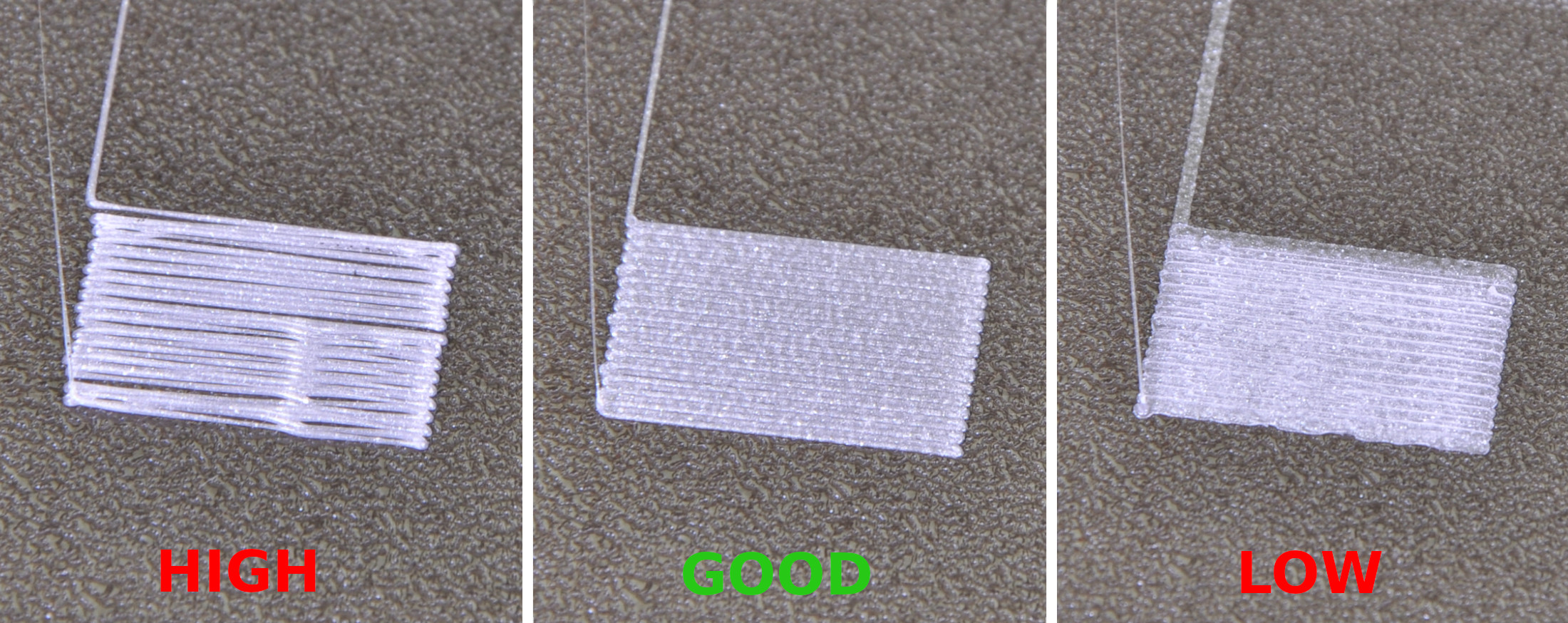
Looks better, but IMO it looks like it’s still calibrated too close to the bed. In some places it looks like the material has been smushed into the surface, and in others it looks like ridges have formed between the lines where the nozzle has pushed excess material around. …prusa3d.com/…/First-Layer-Calibration-04.jpg
nieceandtows@programming.dev 4 months ago
Makes sense, thanks for the picture. Is there a trick to the right friction when using the paper method?
fhein@lemmy.world 4 months ago
I think it’s more of an art form than an exact science to get perfect calibration using the paper method. It gives a decent starting point for further manual adjustment though. Personally I prefer to put a lamp behind the printer, and then babystep the nozzle down until I can no longer see any gap between it and the bed, but that also usually requires a few minor adjustments afterwards.
ServantOfRa@lemmy.blahaj.zone 4 months ago
Those spring steel sheets are designed for magnetic beds that pull them flat so that makes sense. Happy printing!