You do not need to build the next major software company to create a useful online business.
A small website that completes one clear task can attract search traffic, serve users automatically, and open several paths to monetization. AI coding tools have made this model easier to explore because they can help with planning, development, testing, and deployment.
This article examines a four-month text-to-PDF website project built with Claude and Codex and deployed on Vercel. The site reportedly began with a domain cost of about $10 and later gained thousands of organic search clicks.
The example shows the potential of an AI-assisted tool website, but it does not prove guaranteed or fully passive income.
Why Utility Websites Can Work as Digital Assets
A utility website helps visitors complete a specific task.
Instead of asking users to read a long guide, join a community, or speak with a salesperson, the website gives them a working solution. Common examples include converters, calculators, generators, validators, and formatting tools.
These websites can become digital assets because the same tool can serve many people without requiring the owner to manually complete every request.
A useful tool may earn through:
- Display advertising
- Affiliate recommendations
- Paid features
- Software subscriptions
- API access
- Sponsorships
- Donations
The website can keep operating while the owner is away, but that does not make it completely passive.
Development, SEO, testing, technical fixes, and performance monitoring still require time.
What Is an AI-Assisted Tool Website?
An AI-assisted tool website is a digital utility created with support from artificial intelligence.
AI may help write code, explain errors, suggest layouts, create tests, improve mobile behavior, or prepare deployment files. The tool itself does not always need to use AI when visitors interact with it.
For example, a browser-based PDF converter may use standard web technologies to generate documents. Claude or Codex may still help the developer build and improve the application.
This difference matters because a website built with AI is not always an AI-powered service.
Some tools can run directly inside the browser without sending every request to a paid AI model. That can reduce ongoing API expenses and make the project easier to operate.
A Real Example of a Low-Cost Tool Website
Free Text To PDF is a browser-based utility that helps users turn written text into a downloadable PDF document.
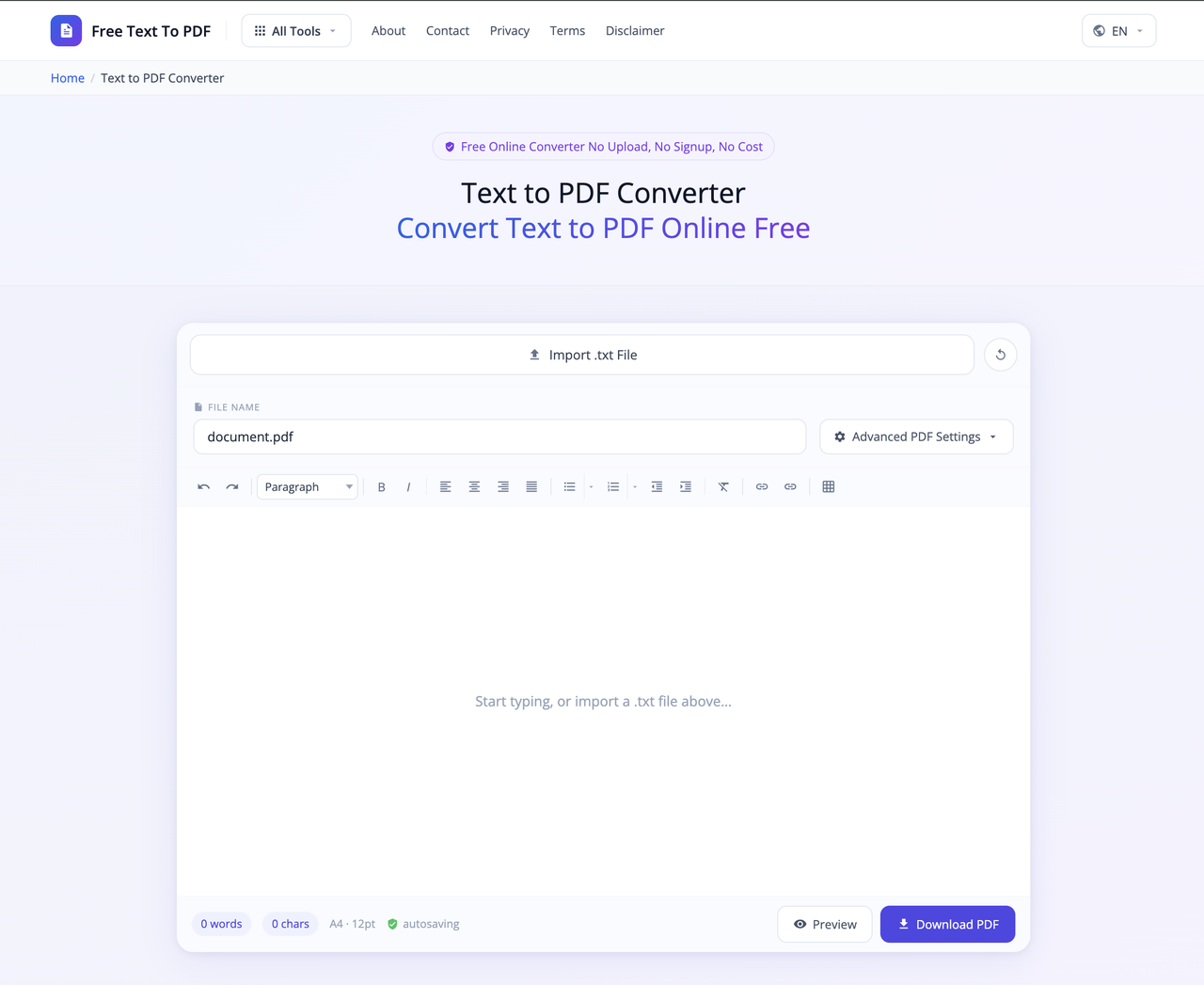
Visitors can prepare text, adjust document settings, and create a PDF without installing full desktop publishing software.
According to information supplied by the website owner, the project was:
- Built with support from Claude and Codex
- Deployed through Vercel
- Started with a domain that cost about $10
- Around four months old when the results were recorded
- Designed to require limited routine management
The project should be called low maintenance rather than maintenance free.
Even a simple tool needs browser testing, security checks, hosting reviews, content updates, and technical monitoring.
What the Early Performance Data Shows
The owner supplied a Google Search Console screenshot with the following results:
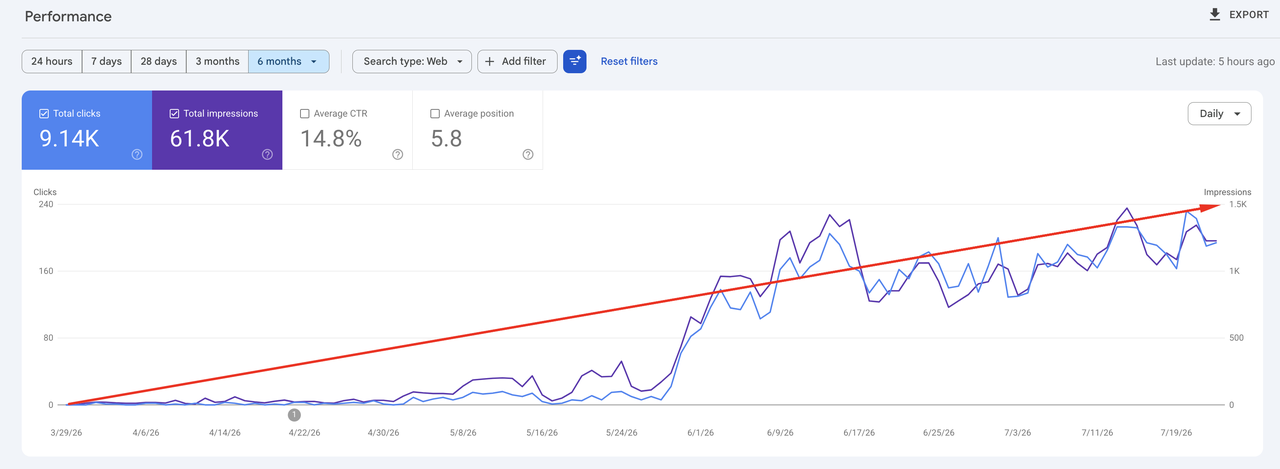
Search metric and Reported result
- Total clicks: 9,140
- Total impressions: 61,800
- Average click-through rate: 14.8%
- Average position: 5.8
The graph showed little activity during the early part of the reporting period. Visibility then increased near the end of May and continued to produce daily clicks.
A separate Google Analytics screenshot showed about 1,100 active users, around 1,100 new users, and nearly 6,400 recorded events during a selected 90-day period.
These platforms measure activity in different ways. Google Search Console clicks should not be expected to match Google Analytics users exactly.
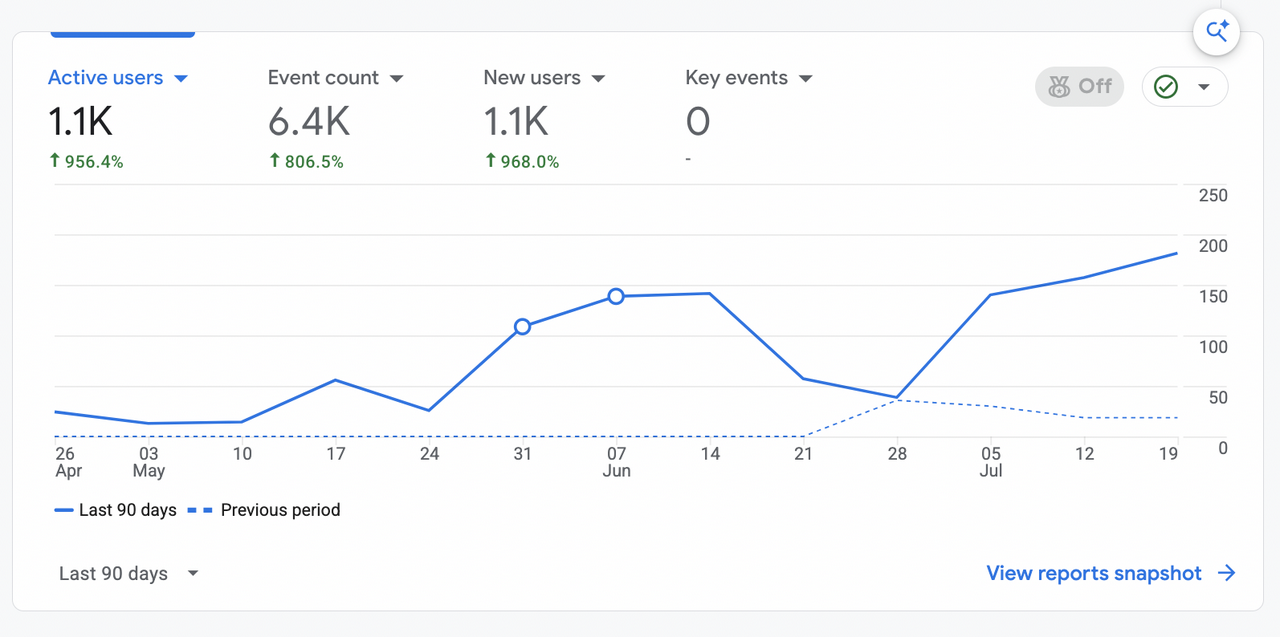
The screenshots also do not provide proof of revenue.
They do not show:
- Advertising income
- Premium purchases
- Affiliate commissions
- Customer lifetime value
- Net profit
- Conversion rate
- Total operating expenses
The results should therefore be viewed as evidence of early search growth, not proof of financial success.
Why a Simple Tool Can Attract Organic Visitors
People often use search engines because they need to finish a task.
Someone searching for a text-to-PDF converter usually does not want a long history of the PDF format. The person wants a working tool that creates the file quickly.
This creates strong task-based search intent.
Similar searches may include:
- Convert plain text to PDF
- Save notes as a PDF
- Turn a TXT file into a PDF
- Create a PDF from pasted text
- Format text for printing
- Download text as a document
A page that matches this intent can be more useful than a general article.
The user should be able to understand the tool, enter the content, choose settings, and download the result with little confusion.
How to Choose a Good Tool Website Idea
The strongest ideas usually solve one narrow and repeated problem.
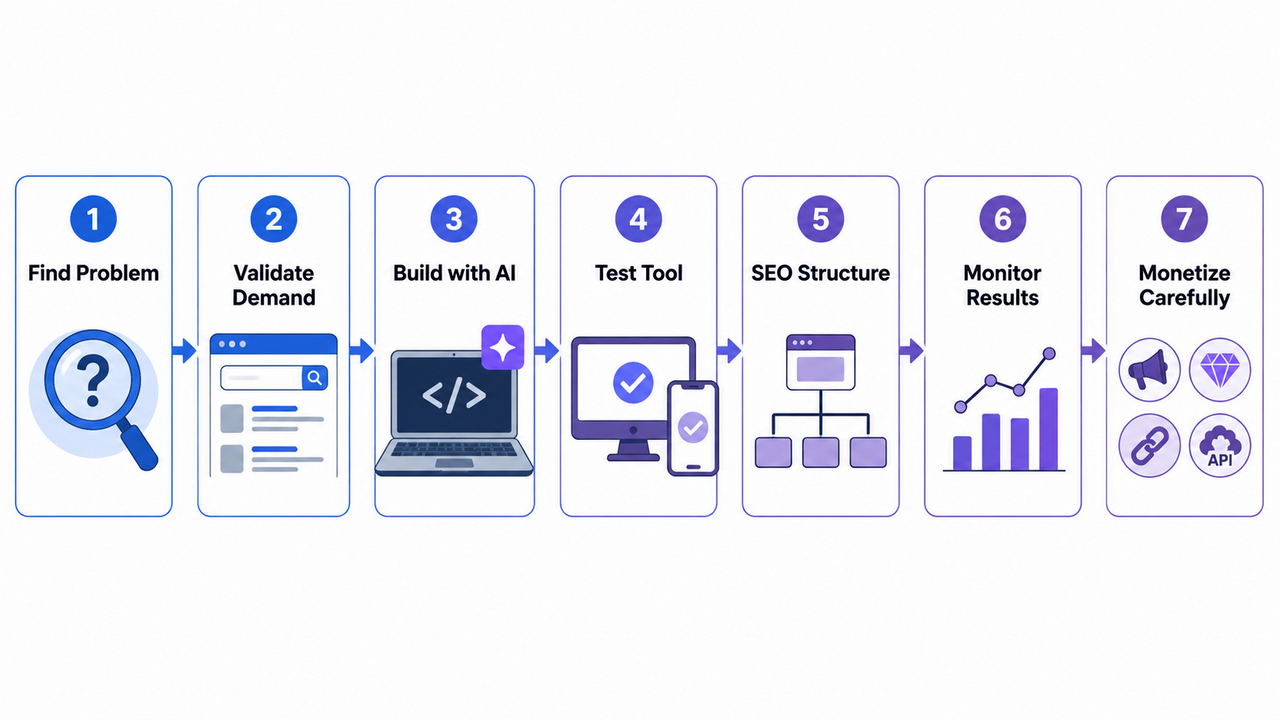
A useful starting idea should meet several conditions:
People already search for the task.
The task can be completed online.
The result provides immediate value.
The first version is small enough to build.
Existing solutions have clear weaknesses.
The website can support related tools later.
Good categories may include:
- File conversion
- Text formatting
- Image resizing
- Data checking
- Financial calculations
- Document creation
- Code validation
- Measurement conversion
- Productivity templates
Avoid choosing an idea only because a keyword tool shows a large search volume.
A large keyword may have powerful competitors, weak monetization, or unclear intent. A smaller problem with a clear user need can be more practical for a beginner.
Research the Problem Before Writing Code
Development should begin after demand is checked, not before.
Start by studying the current search results.
Look at:
- The types of pages that rank
- The features included in popular tools
- Mobile usability
- Page speed
- Registration requirements
- Privacy information
- Advertising placement
- User complaints
- Missing functions
- Related search questions
You can also study forums, product reviews, and social discussions to find repeated problems.
For example, users may dislike converters that require an account, upload private files, cover buttons with ads, or fail on mobile devices.
These problems can become product opportunities.
Build One Complete Feature First
A common mistake is trying to launch ten tools at the same time.
A better approach is to create one small but complete experience.
For a text-to-PDF website, the first version might need:
- A text input area
- Basic formatting
- Page size selection
- Margin controls
- A PDF preview
- A working download button
- Mobile support
- Clear error messages
The first version does not need dozens of templates, user accounts, team workspaces, or cloud storage.
Those features can be considered after real users begin using the tool.
A smaller launch also makes testing easier.
How Claude and Codex Can Support Development
AI coding tools can help a beginner move from an idea to a working prototype.
They may assist with:
- Creating a project structure
- Writing front-end components
- Explaining unfamiliar code
- Finding syntax problems
- Improving responsive design
- Adding input validation
- Creating accessibility labels
- Preparing deployment settings
- Writing test cases
- Reviewing common security risks
However, AI-generated code must still be checked.
It may produce outdated packages, insecure logic, duplicate code, weak error handling, or features that appear correct but fail in real use.
A developer should test each important workflow rather than trusting the first generated answer.
Test the Tool Like a Real Visitor
A tool may work perfectly with one short example and fail with real content.
Testing should include different devices, browsers, and input types.
Try:
- Empty text fields
- One-line documents
- Very long text
- Special characters
- Different languages
- Copied content with unusual spacing
- Mobile screens Slow internet
- Repeated button clicks
- Large documents Chrome and Safari
Also check whether the user receives a useful message when something goes wrong.
A confusing error can cause a visitor to leave even when the problem is easy to fix.
Create a Search-Friendly Page Structure
The working utility should be the main purpose of the page.
Do not force visitors to scroll through a long SEO article before reaching the feature they searched for.
A useful tool page may contain:
- One clear H1
- A short explanation
- The main tool
- Simple instructions
- Main use cases
- Privacy information
- Supported formats
- Frequently asked questions
- Related utilities
- Contact and legal pages
The supporting content should help users understand and trust the tool.
It should not exist only to repeat keywords.
Google says that generative AI can assist with research and structure, but website owners remain responsible for accuracy, quality, and relevance. Producing many pages without useful value can create policy and quality risks.
Build Around One Clear Topic
After the main tool works, expand into closely related needs.
A PDF-focused website could add:
- PDF to text
- Markdown to PDF
- RTF to PDF
- EPUB to PDF
- Text file formatting
- PDF page size guides
- PDF privacy explanations
- Printable document templates
This creates a connected topic area.
The website becomes a useful destination for people who work with documents and file conversion.
Adding unrelated tools simply to increase the page count can confuse users and weaken the site’s identity.
Each new page should solve a separate problem and provide a complete experience.
Use Real Behavior to Improve the Product
Traffic reports are useful, but they do not show the full user experience.
A tool owner should also measure whether visitors complete the task.
Useful events may include:
- Tool started
- File imported
- Settings changed
- Preview opened
- PDF generated
- Download completed
- Error displayed
- Related tool opened
- Visitor returned
These events can reveal problems that page views cannot show.
For example, a page may attract 5,000 visits, but only a small percentage may complete the download. That could point to a broken button, slow process, unclear instructions, or poor mobile layout.
How a Free Tool Website Can Generate Revenue
A free tool can support several business models.
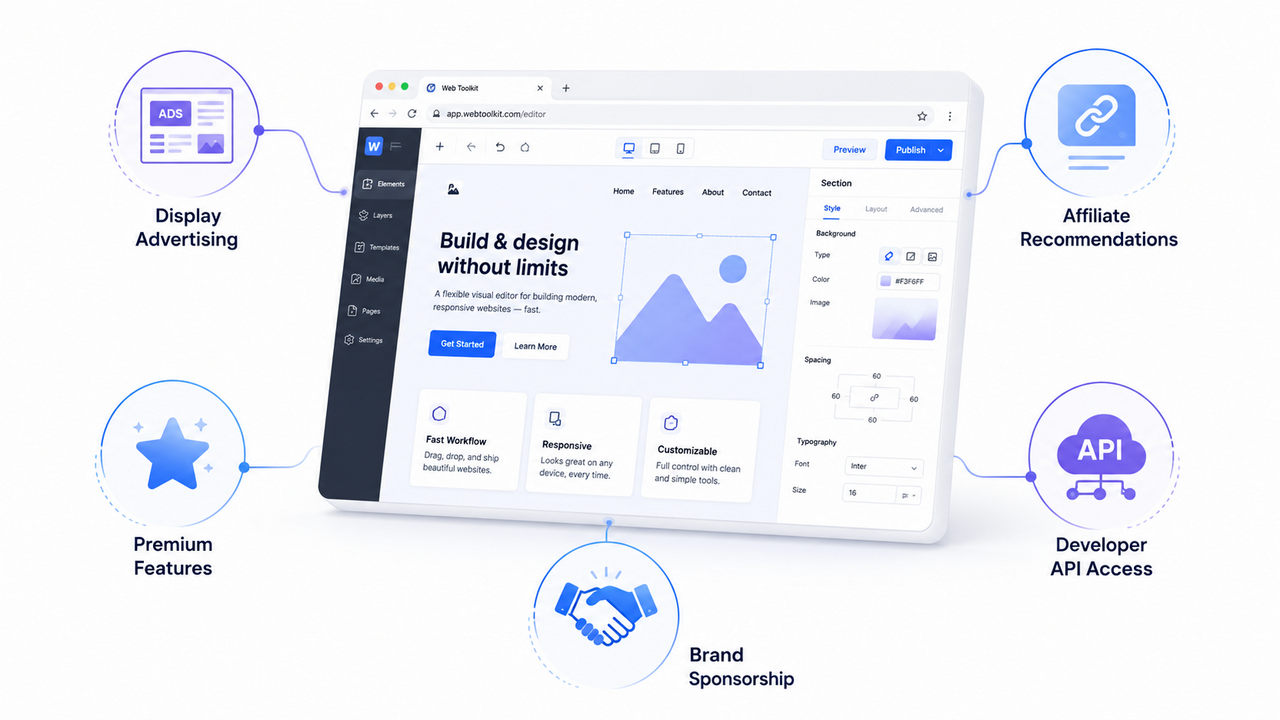
The right choice depends on the type of user, frequency of use, and level of traffic.
Display Advertising
Advertising can work for tools with steady search traffic.
It is simple for users because the main feature can remain free. However, too many ads can slow the page and make the controls difficult to use.
Ad placement should never block the main task.
Google advises AdSense publishers to offer original and relevant content and to organize pages so visitors can easily find what they need.
Paid Upgrades
A free basic tool can offer advanced functions through a paid plan.
Possible premium features include:
- Larger input limits
- Batch processing
- Saved projects
- Advanced templates
- Custom branding
- No advertisements
- Team access
- Cloud history
This model is more suitable when users return often or use the tool for professional work.
Affiliate Partnerships
A website can recommend products that help the same audience.
A document tool may naturally mention cloud storage, electronic signature software, writing applications, business templates, or printing services.
The recommendation should solve a related problem.
Random affiliate offers may generate little income and reduce trust.
API Access
A reliable tool may later provide an API for developers or companies.
This allows another website or application to use the conversion feature automatically.
API access requires more technical work, including authentication, rate limits, monitoring, billing, and documentation.
Sponsorships
A relevant company may pay to appear beside a useful tool.
This usually becomes realistic after the website has a stable audience and clear usage data.
Voluntary Support
A donation option can work when people appreciate a free and private tool.
It may provide extra support, but it should not be treated as predictable revenue.
A Natural Example of the Tool Model
A student, writer, teacher, or business owner may prepare notes in plain text and later need a clean file for printing or sharing.
A browser-based service such as Free Text To PDF fits that final step by helping the user convert prepared text into a downloadable PDF.
This is also a useful example of a narrow tool website. It focuses on one clear job rather than trying to become a complete office platform.
What May Have Helped the Website Gain Visibility
The supplied data does not identify one confirmed cause, but several factors may have supported growth.
It Matches a Clear Action
The site serves people who already know what they want to do.
A visitor searching for text-to-PDF conversion can use the tool immediately.
The Value Is Easy to Understand
The purpose does not need a long explanation.
Users can quickly see the input area, settings, and expected output.
The Tool Supports a Complete Task
A useful converter does more than discuss PDFs. It helps the visitor create one.
This direct value may support engagement and repeat use.
The Site Can Expand Semantically
Related document and conversion tools can strengthen the overall topic without moving into random categories.
It Appeared in Useful Search Positions
The reported average position of 5.8 suggests that many impressions occurred near the first page of Google.
However, average position can cover many searches and pages. Detailed query data would be needed before drawing a firm conclusion.
Important Costs Beginners May Overlook
The domain may be the only starting expense, but it is not always the only long-term cost.
Possible expenses include:
- Commercial hosting
- Email delivery
- Storage Databases
- Paid APIs
- Monitoring Security services
- Development help
- Design assets
- Privacy or legal support
- Analytics upgrades
The website owner should also review the hosting plan before monetizing the project.
Vercel currently describes its Hobby plan as intended for personal and non-commercial use, while its Pro plan is aimed at professional developers and businesses.
A project that becomes commercial should confirm that its hosting plan matches its actual usage.
Common Problems That Can Limit Growth
Publishing Before Testing Mobile Devices
Many visitors may use phones.
A tool that works only on desktop can lose traffic, trust, and conversions.
Depending Completely on AI Code
AI can assist development, but it cannot accept responsibility for security or reliability.
Human review remains necessary.
Creating Thin Pages for Every Keyword
Changing one phrase on dozens of pages does not create meaningful value.
Each page needs a real purpose, distinct content, and a working solution.
Hiding Privacy Details
People may paste private notes, business information, or personal documents into a converter.
Explain clearly whether information stays in the browser, reaches a server, or is stored.
Covering the Interface With Ads
The main feature should remain easy to use.
Short-term advertising gains may not be worth losing repeat visitors.
Ignoring Errors After Launch
Browsers, packages, hosting limits, and user behavior can change.
A tool should be monitored even when it operates automatically.
Assuming Rankings Are Permanent
Search visibility can rise or fall because of competition, technical problems, content quality, and search changes.
Google also states that meeting technical and quality requirements does not guarantee indexing or visibility.
Is the Income Really Passive?
The delivery of the tool can be automated.
Visitors can arrive, complete the task, and view ads or purchase an upgrade without the owner serving each person manually.
That is the passive part.
The business itself still needs active care.
Someone must:
- Review performance
- Fix bugs
- Improve weak pages
- Check hosting usage
- Protect user data
- Test browsers
- Maintain legal pages
- Review monetization policies
- Respond to important feedback
The realistic goal is not zero work.
The goal is to build a useful system that can serve many visitors without equal growth in manual labor.
Can Beginners Build This Type of Website?
Yes, but the first project should be small.
A beginner does not need to master every programming language. AI assistants can explain many technical tasks and help create a basic version.
However, the owner should still learn enough to understand:
What the tool does Where user data goes How the website is hosted How errors are recorded How mobile testing works How search engines access the site How monetization affects usability
Professional help may be needed when the tool handles sensitive files, payments, user accounts, or complex server operations.
Conclusion
An AI-assisted utility website can become a strong digital asset when it solves a real problem and delivers the result with little friction.
The Free Text To PDF project shows how a focused idea, AI-supported development, low initial spending, and search visibility can create meaningful early momentum. It does not prove guaranteed income, but it offers a practical model for beginners.
Start with one task, confirm that people need it, launch a complete first version, test real user behavior, and expand only into closely related problems. Revenue is more likely to follow when usefulness comes first.